Using our built in date range filter example:
select *
from payments
where [payments.created_at=daterange];
select *
from payments
where [payments.created_at=daterange];From the dashboard UI you can update the Date Range filter to generate new queries.
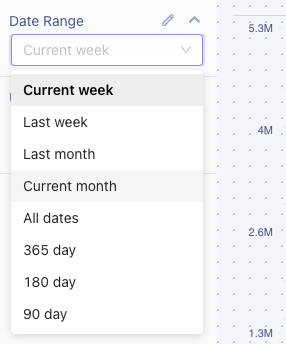
Date range picker on dashboard view
A custom date range is also available in the UI.
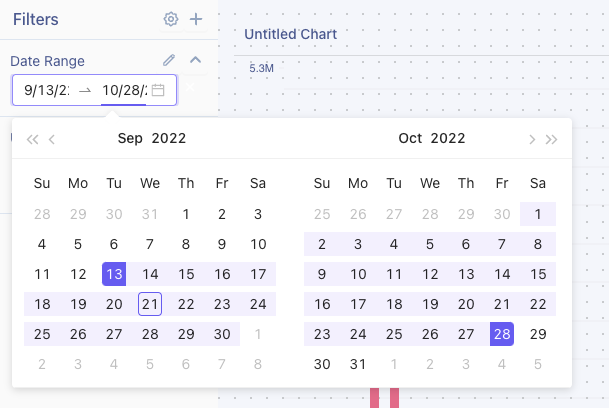
Custom date range picker
When using the date range filter, the query would be modified to something like postgres example:
select *
from payments
where
  payments.created_at >= '2022-09-13':: date
	and
  payments.created_at < ('2022-10-28':: date + interval '1 day'):: date
select *
from payments
where
payments.created_at >= '2022-09-13':: date
and
payments.created_at < ('2022-10-28':: date + interval '1 day'):: dateDate range values
Every date range is a single string value. The dashboard picker sets it for you, and an
embed or API call passes the same string in its filter payload.
| Value | Range it covers |
|---|---|
current_week | Monday through Sunday of the current week |
last_week | Monday through Sunday of the previous week |
current_month | The 1st of the current month through the end of the month |
last_month | The previous calendar month |
quarter | The current calendar quarter |
last_quarter | The previous calendar quarter |
all_dates | No date restriction at all |
1_day | Today |
3_day | The last 3 days, including today |
7_day | The last 7 days, including today |
14_day | The last 14 days, including today |
30_day | The last 30 days, including today |
60_day | The last 60 days, including today |
90_day | The last 90 days, including today |
180_day | The last 180 days, including today |
365_day | The last 365 days, including today |
Values are matched exactly: all lowercase, underscores rather than spaces.
current_month
is a date range, Current Month
is not.quarter
and last_quarter
are not offered in the dashboard picker, but they are valid
values to pass from an embed or API call.all_dates
does not narrow the query at all - the filter renders as 1=1
. That is the
point of it, but it also means the chart reads your full history, so expect it to be the
slowest option on a large table.Custom date ranges
A custom range is two dates joined by the word
to
, each in YYYY-MM-DD
form:"Date Range": "2026-01-01to2026-03-31""Date Range": "2026-01-01to2026-03-31"Both ends are inclusive, so the range above covers all of March 31.
Passing a date range to an embed
Use
Date Range
as the key in the filter payload you sign, with one of the values above:// the current calendar month
filters: {
"Date Range": "current_month",
"Aggregation": "day",
"ClientId": "YourClientId",
},
// everything, with no date restriction
filters: {
"Date Range": "all_dates",
"Aggregation": "month",
"ClientId": "YourClientId",
},// the current calendar month
filters: {
"Date Range": "current_month",
"Aggregation": "day",
"ClientId": "YourClientId",
},
// everything, with no date restriction
filters: {
"Date Range": "all_dates",
"Aggregation": "month",
"ClientId": "YourClientId",
},Both
Date Range
and daterange
work as the key. daterange
is the name the SQL token
itself uses, and Date Range
is the name of the filter the dashboard creates for you.
Either one is matched exactly, so date range
, Date range
, and DateRange
are not
recognized and the chart errors with Missing filter value for daterange in query
.If your own application has its own date picker, map its options onto these values before
you sign the payload. Anything Tractorscope does not recognize is treated as a custom
range, which either fails validation or - if the value happens to contain the letters
to
, as in month_to_date
- builds a query your database then rejects. The embedded
chart reports that as An error pulling report occurred
.The same value applied in the Tractorscope dashboard will show you the underlying database
error, so it is the quickest way to check a value your embed is unhappy with.
Required and optional date range filters
A required filter must have a value. If the payload does not carry one, the chart errors
with
Missing filter value for daterange in query
:select * from payments where [payments.created_at=daterange]select * from payments where [payments.created_at=daterange]Wrapping the filter in double brackets makes it optional. With no value it renders as
1=1
and the chart returns everything:select * from payments where [[payments.created_at=daterange]]select * from payments where [[payments.created_at=daterange]]Time zones
Week, month, and custom ranges are worked out in the time zone configured on the database
connection, not the viewer's browser. Rolling day ranges and quarters are resolved against
the database server's own clock.
FAQ
Should the filter key be Date Range or daterange?
Either.
daterange
matches the SQL token directly and Date Range
is the name of the
dashboard filter. Both are case-sensitive.What values can I pass as a date range from an embed?
Any value in the table above, or a custom
YYYY-MM-DDtoYYYY-MM-DD
range. They are
case-sensitive.What happens if I pass a value Tractorscope does not recognize?
It is treated as a custom date range. Most unrecognized values fail validation outright,
and a value containing
to
produces an invalid query that the database rejects. Either
way the chart does not render.Does all_dates filter anything?
No. It applies no date restriction, which is why it is the slowest option on large tables.
Are date ranges inclusive of the last day?
Yes. A range through
2026-03-31
includes everything that happened on March 31.Which time zone are the ranges calculated in?
The one configured on the database connection the chart queries.