In Tractorscope, AI chart creation turns a natural-language prompt and your selected schema into a draft SQL query, chart type, title, and initial visualization settings.
Tractorscope can help create charts from natural-language prompts. AI chart generation is useful when you know the metric or question you want to answer but do not want to start from a blank SQL editor.
How AI chart creation works
When you create a chart with a prompt, Tractorscope uses your selected database schema and prompt to generate a SQL query, choose a chart type, name the chart, and create initial chart settings.
You can review and edit the generated SQL and chart configuration before relying on the result.
Work with it from the Interact tab beside the chart. Each answer comes back as proposals you stage rather than changes applied for you — a rewritten query, a chart type, a settings block, a series colour — and nothing persists until you save:
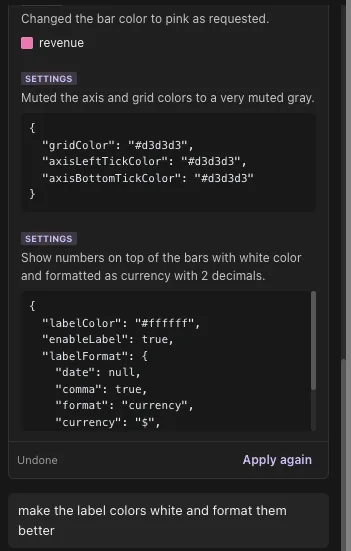
Every proposal can be undone or re-applied from the card itself.
Example prompts
- Show monthly revenue for the last 12 months.
- Count new users by week.
- Show active accounts by plan.
- Compare completed orders by region.
- Create a table of the top 50 customers by total spend.
Suggested prompts
Tractorscope can suggest prompts based on the database tables available to the chart. Suggested prompts are starting points; adjust them to match the business question you need to answer.
AI chat
AI chat can answer database-specific questions and help refine a chart. Use it to ask for SQL changes, chart improvements, or ideas for additional dashboard metrics.
Best practices
- Be specific about the metric, time period, grouping, and filters.
- Review generated SQL before sharing the chart.
- Confirm the result against known data when accuracy matters.
- Use clear table and column names in your database when possible.